



















A smarter investment property depreciation calculator
TaxTank’s investment property depreciation calculator helps you calculate and track depreciation without relying on spreadsheets.
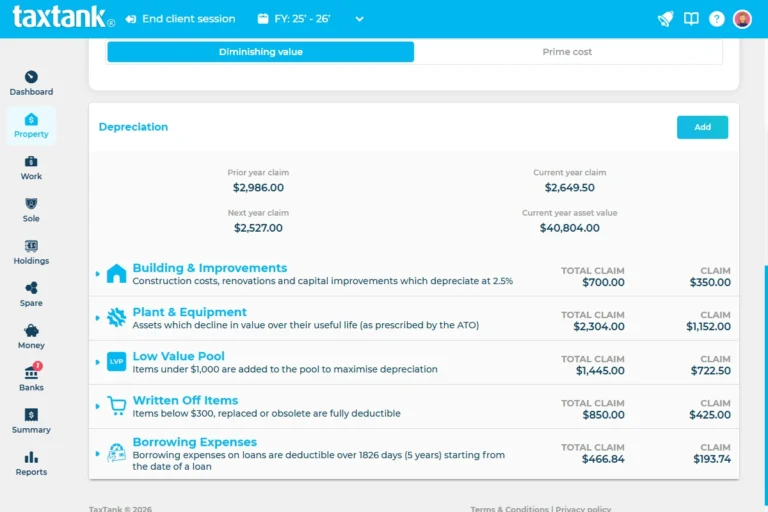
Add an existing depreciation schedule, individual assets, renovations or capital works, and TaxTank calculates your depreciation as part of your overall property tax position.
- No Credit Card Required
- Built for Australian property investors

Property depreciation without the spreadsheets
Property depreciation can run for decades, so keeping accurate records from one financial year to the next matters.
TaxTank keeps your depreciation with the property it belongs to. Add an existing depreciation schedule, individual assets, renovations or capital works, and TaxTank handles the ongoing calculations for each financial year.
No manually carrying figures forward in spreadsheets or starting your depreciation calculations again each tax year.
And because your depreciation sits alongside your rental income, deductible expenses and other property tax information, you can see how it affects your overall tax position throughout the year.
Set it up once. TaxTank takes care of the ongoing calculations.

- Property Depreciation
- Rental Income & Expenses
- Property Tax
- CGT
What property depreciation can you manage in TaxTank?
TaxTank brings the different parts of your property depreciation together, whether you’re working from an existing quantity surveyor schedule or adding new assets, renovations and improvements as they occur.
One property. One ongoing depreciation record.
Your depreciation stays with your property, with the calculations updated each financial year.
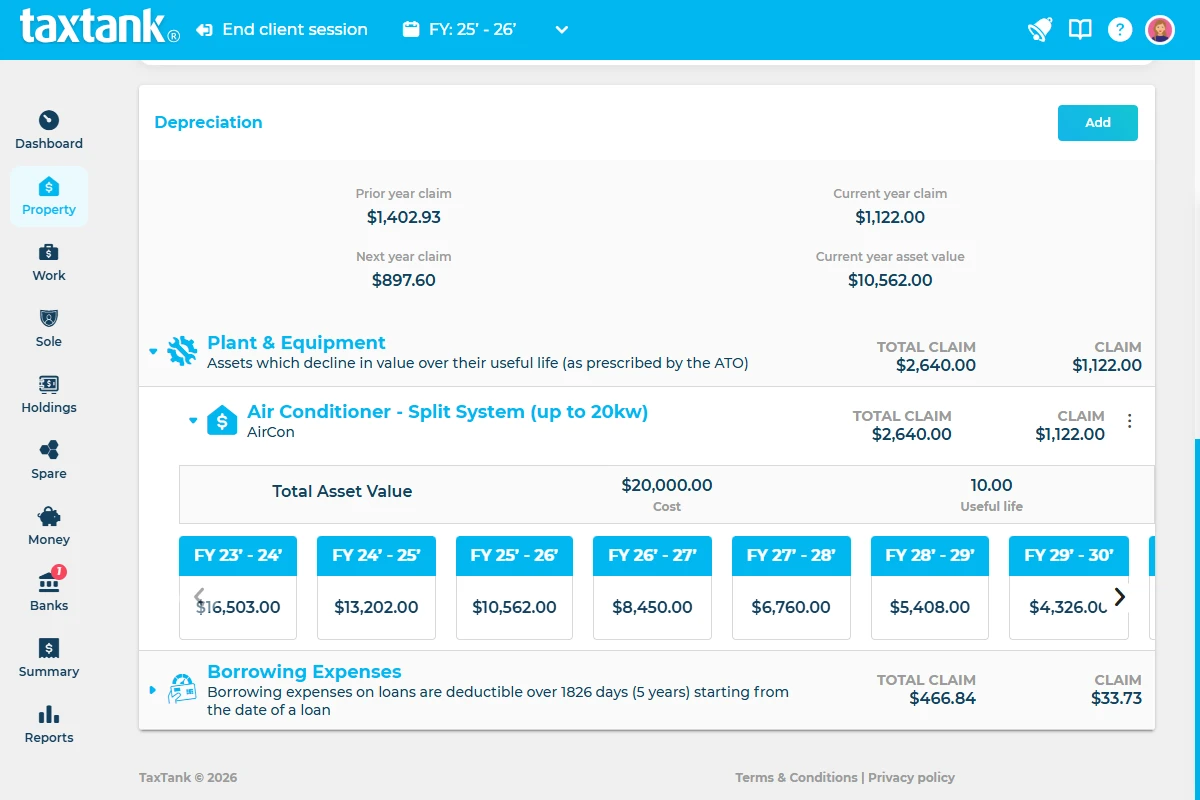
Plant & Equipment
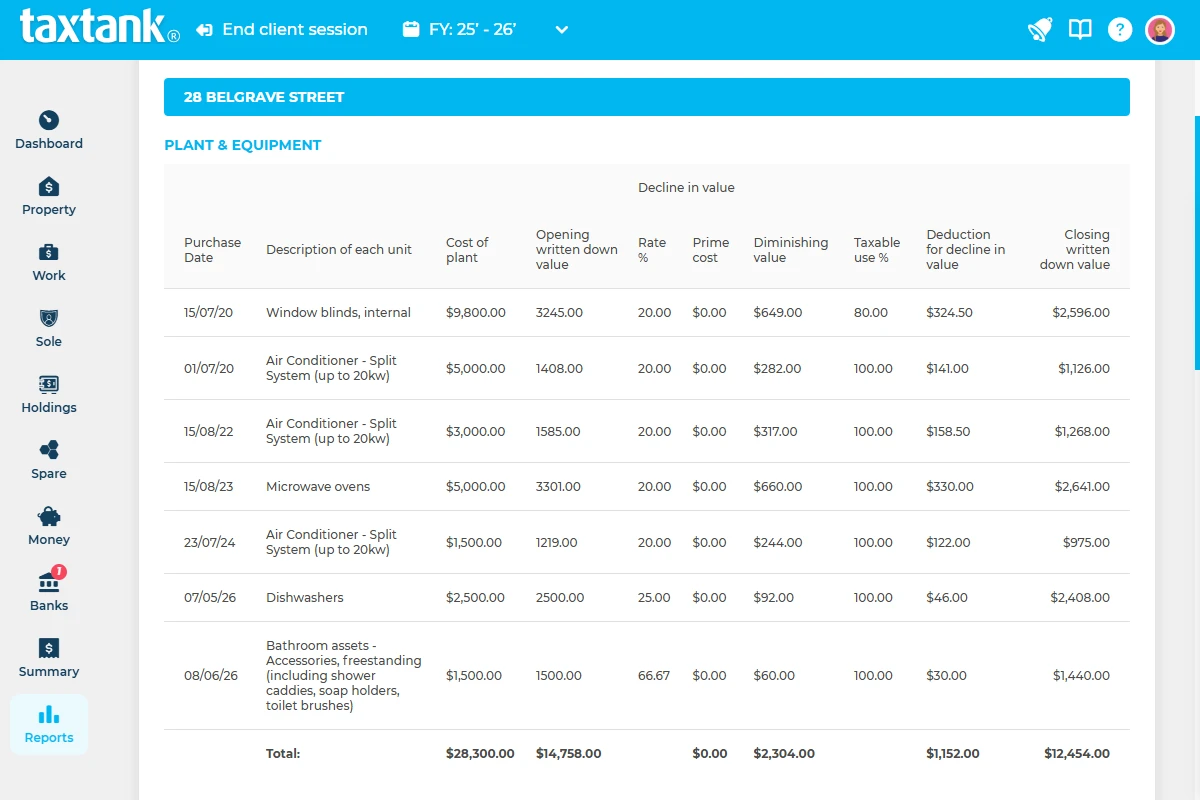
Add depreciating assets and calculate deductions using the applicable depreciation method and effective life.
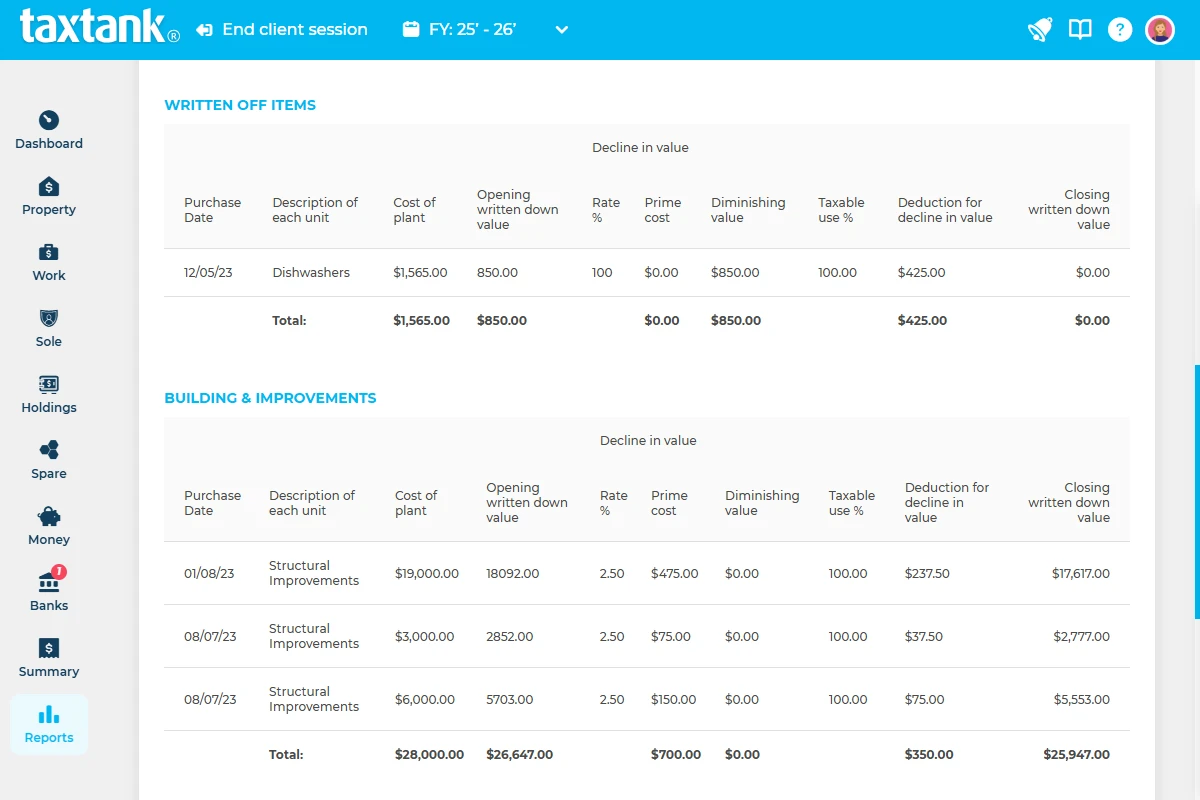
Building & Capital Works
Calculate and track eligible construction costs, renovations and structural improvements over their applicable deduction period.
Automatic Low Value Pool
TaxTank automatically moves eligible Diminishing Value assets into the Low Value Pool when their depreciated value falls below $1,000 and applies the relevant depreciation treatment from there.
Renovations & Improvements
Add renovations and improvements to the property and calculate their applicable deductions over future financial years.
Existing Depreciation Schedules
Already have a quantity surveyor’s schedule? Add it to TaxTank and continue calculating and tracking the depreciation from there.
Custom Depreciation Items
Add depreciation items that don’t fit the standard categories while keeping them with the relevant property.


How TaxTank's investment property depreciation calculator works
Once your property is set up in TaxTank, managing your ongoing depreciation is simple.

1. Add your investment property
Set up your property in Property Tank, including its ownership details and relevant tax information.

2. Add your depreciation
Enter an existing depreciation schedule or add individual depreciating assets, renovations, improvements and capital works.

3. Let TaxTank calculate it year after year
TaxTank calculates the applicable depreciation for each financial year alongside your rental income and deductible expenses.
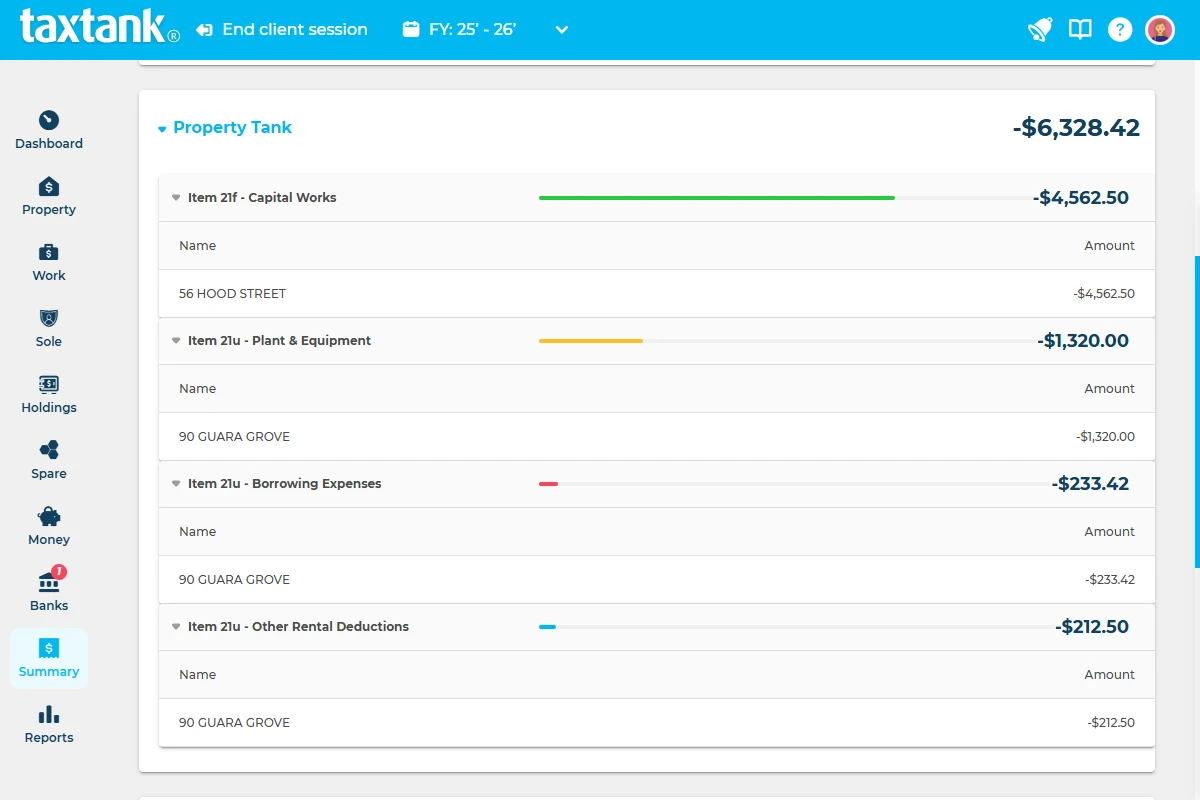
No starting over each tax year. Your depreciation stays with your property, helping keep your records and tax calculations up to date.
Built around Australian property tax rules
Property depreciation involves different methods, thresholds and treatments depending on the asset. TaxTank has Australian tax rules built into its calculations, so you don’t have to keep track of every detail yourself.
For plant and equipment, TaxTank includes ATO useful-life categories and supports both Diminishing Value and Prime Cost depreciation methods.
It also manages the ongoing treatment of depreciating assets. When an eligible asset falls below $1,000, TaxTank automatically moves it into the Low Value Pool and applies the relevant depreciation calculations from there.
For capital works, renovations and improvements, TaxTank calculates the applicable deductions and maintains the schedule across future financial years.
You don’t need to keep track of all the depreciation rules yourself. TaxTank applies them in the background.
A typical property depreciation setup vs TaxTank
More than an investment property depreciation calculator. TaxTank brings depreciation, rental income, deductible expenses and property tax calculations together, giving you a much clearer picture than a standalone depreciation figure.
Typical setup
- Depreciation schedule kept separately from your other property records
- Figures manually carried forward each financial year
- Assets and improvements tracked across spreadsheets or separate records
- You need to keep track of depreciation methods and asset treatment
- You need to monitor when eligible assets fall into the Low Value Pool
- Rental income and expenses managed separately from depreciation
- Depreciation gives you one part of the tax picture
- CGT records may be maintained separately again
- Multiple properties mean multiple sets of records to maintain
TaxTank
- Depreciation stays connected to the investment property
- Depreciation calculations carry forward year after year
- Assets, renovations, improvements and capital works managed in one place
- TaxTank applies the relevant depreciation calculations in the background
- TaxTank automatically moves eligible assets into the Low Value Pool below $1,000
- Income, expenses and depreciation are managed together
- Depreciation contributes to your overall calculated property tax position
- Property records also feed into TaxTank’s CGT calculations
- Each property has its own ongoing tax and depreciation records
You don’t need another property spreadsheet. You need the full picture.
Your depreciation is only one part of owning an investment property.
TaxTank brings depreciation, rental income, deductible expenses, tax calculations and property performance together, so you can understand where your property stands throughout the year.
From the deductions you claim today to CGT when you eventually sell, your property records stay together in one place.
Property tax software that pays attention to the details
Property Tank starts from just $15 per month, paid annually, giving Australian property investors one place to manage depreciation, rental income, expenses, CGT and their calculated property tax position.
Instead of maintaining separate spreadsheets, depreciation records and property tax calculations, TaxTank keeps everything together for each property, with Australian tax rules built in.
- Free Trial
- No Credit Card Required
- Cancel Anytime
PROPERTY TANK
Simply add Property Tank so you can monitor your whole property portfolio in one place. You can manage up to 5 properties for only $15* a month.
$15/month
Paid Annually
ADDITIONAL
PROPERTIES
Have more than 5 properties? No problem, you can add as many as you like with our property add-on.
$3/month
Paid Annually
See why Australians choose TaxTank for real-time tax calculations and management
It's literally about 10 minutes a week to allocate transactions and I'm on top of my paperwork which means no more spreadsheets or tax time stress.”



Frequently asked questions
Does TaxTank create a depreciation schedule?
TaxTank can create and calculate depreciation schedules for capital works, renovations and improvements you add to your property. It can also calculate and track depreciation for individual depreciating assets.
Already have a depreciation schedule from a quantity surveyor? You can add it to TaxTank and continue calculating and managing the depreciation from there.
TaxTank doesn’t replace a quantity surveyor where a professional property depreciation assessment is required.
What does TaxTank’s investment property depreciation calculator include?
TaxTank’s investment property depreciation calculator helps you calculate and manage plant and equipment, capital works, renovations and improvements, Low Value Pool assets and custom depreciation items. You can also add an existing quantity surveyor depreciation schedule and continue managing the calculations within TaxTank.
Can I use TaxTank’s investment property depreciation calculator for multiple properties?
Yes. You can manage depreciation separately for each investment property in Property Tank, alongside the property’s rental income, expenses and tax calculations.
Does TaxTank's investment property depreciation calculator calculate capital works?
Yes. TaxTank calculates depreciation schedules for eligible capital works, renovations and improvements and carries the calculations across future financial years.
Does TaxTank calculate investment property depreciation every financial year?
Yes. Once your depreciation details are set up, TaxTank calculates the applicable depreciation for each financial year, so you don’t need to manually carry the figures forward in spreadsheets.
Can I use an existing quantity surveyor schedule with the investment property depreciation calculator?
Yes. If you already have a depreciation schedule, you can add it to TaxTank and continue calculating and tracking the depreciation for the property.
What types of property depreciation can TaxTank manage?
TaxTank can manage plant and equipment, building and capital works, renovations and improvements, Low Value Pool assets and custom depreciation items.
Does TaxTank calculate depreciation automatically each year?
Yes. Once your depreciation information is set up, TaxTank carries the calculations forward into future financial years, so you don’t need to start again each tax year.
Does TaxTank support different depreciation methods?
Yes. TaxTank calculates and tracks property depreciation, capital works deductions and replacement assets across your investment portfolio.
You can add assets directly from your quantity surveyor’s depreciation schedule, record renovations and improvements, and track replacement assets purchased over time. TaxTank automatically applies the appropriate tax treatment and calculates the deductions available each year.
What happens when an asset falls below $1,000?
For eligible assets, TaxTank automatically moves the asset into the Low Value Pool when its depreciated value falls below $1,000 and continues calculating the applicable depreciation.
Is TaxTank only an investment property depreciation calculator?
No. Depreciation is just one part of Property Tank. You can also manage rental income, deductible expenses, borrowing expenses and property records, while TaxTank calculates your property tax position and keeps the information needed for CGT connected to the property.
Can I manage more than one investment property?
Yes. You can add multiple investment properties to Property Tank and manage the income, expenses, depreciation and tax records for each property separately.