
Work from home tax calculator that tracks more than a deduction
Track your working-from-home hours, manage your home office expenses and see how your deductions affect your estimated tax position throughout the year.
TaxTank’s work from home tax calculator combines Australia’s first digital home office diary with live Australian tax calculations. It helps you maintain the records behind your deduction without relying on spreadsheets or trying to recreate your hours at tax time.
- No Credit Card Required
- Built for Australian taxpayers
As seen in














More than a basic work from home tax calculator
A basic work from home tax calculator may give you a one-off estimate based on the hours or expenses you enter.
TaxTank helps you manage the information behind the calculation throughout the year.
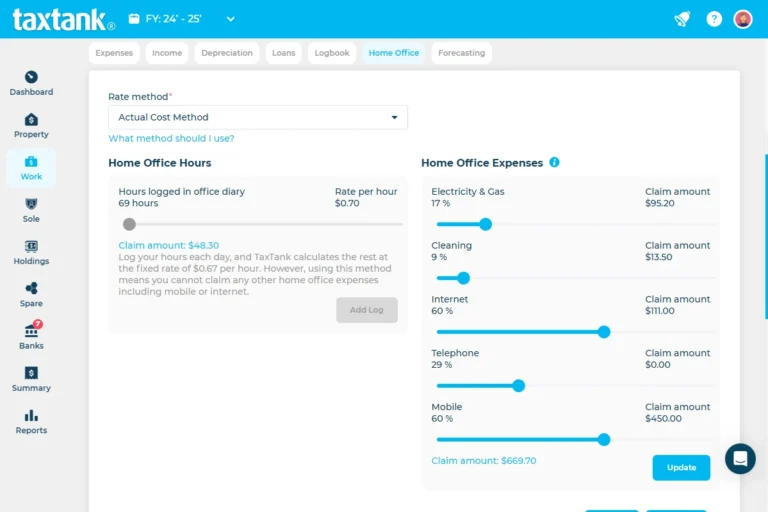
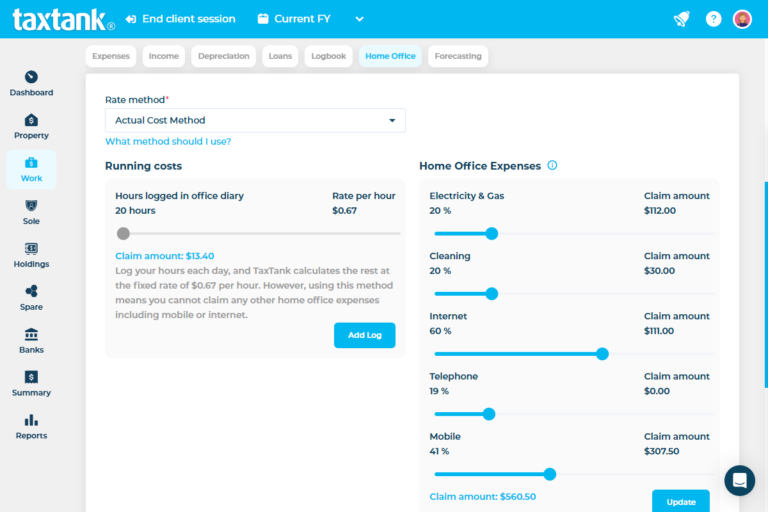
Record your working-from-home hours in your digital Home Office Diary, track relevant expenses and keep your supporting records together. Your recorded deductions are then included in your overall tax position alongside your employment income and other taxable income.
As your income and deductions change, your live tax position changes with them.
- Home Office Diary
- WFH Expenses
- Live Tax Position
- Receipt Storage
Stop trying to recreate your WFH records at tax time
Working from home deductions require more than remembering that you regularly worked from your kitchen table or home office.
You may need records of the hours you worked from home, receipts for relevant expenses and evidence showing how you calculated the work-related portion of shared household costs.
Australia’s first digital home office diary helps you record your working-from-home hours as they happen. You can also allocate expenses from connected bank accounts and attach receipts and supporting documents directly to your transactions.
Instead of trying to reconstruct an entire year of working arrangements at tax time, your records are already organised.
Calculate and manage your work from home expenses
TaxTank gives Australian employees the tools to record their WFH hours, organise home office expenses and understand how their deductions affect their tax.

Record your WFH hours
Use Australia’s first digital home office diary to record the dates and hours you work from home throughout the year.

Track home office expenses
Identify and allocate relevant expenses from your connected bank accounts so they are easier to manage and less likely to be forgotten.

Track home office assets
Manage work-related equipment and assets, with depreciation calculations applied where required.
See estimated tax position
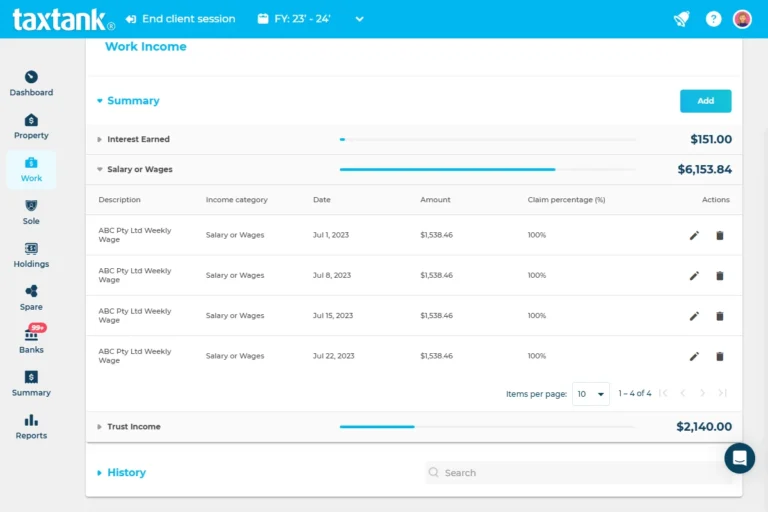
See how your recorded employment income, WFH deductions and other taxable income contribute to your live tax position.

Automate recurring transactions
Create bank rules to allocate regular expenses, such as phone bills, internet costs and software subscriptions.

Attach receipts to transactions
Attach receipts and supporting documents directly to individual expenses instead of storing them across emails, folders and different apps.

Manage apportioned expenses
Record the work-related portion of shared expenses such as phone, internet and other eligible home office costs.

Keep records ready for tax time
Access your tax information throughout the year and invite your accountant to collaborate directly in TaxTank.
Want to understand what you can claim and how the different methods work? Read our complete guide to work from home deductions in Australia.
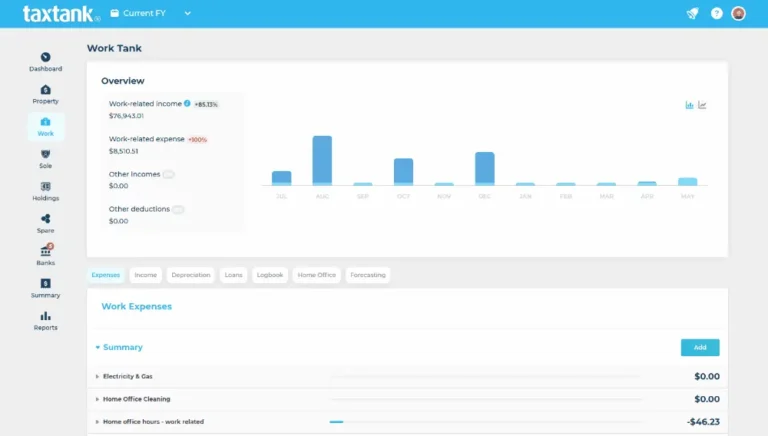
Track the information behind your WFH deduction
The amount you may be able to claim depends on your working arrangements, the calculation method used, any private use and the records you maintain.
Depending on your circumstances, relevant records may include:
- The dates and hours you worked from home
- Electricity and energy costs
- Phone and internet use
- Office equipment and furniture
- Computers and electronic devices
- Stationery and office supplies
- Cleaning costs for a dedicated home office
- Receipts and supporting calculations
TaxTank helps you keep your working hours, expenses and supporting documents together, but you remain in control of the information you record and claim.
Connect your WFH deductions to your overall tax position
Your working-from-home expenses are only one part of your tax position.
TaxTank brings together your employment income and work-related deductions, along with other recorded income from investments, government payments, trusts, partnerships and directors’ fees.
When you add other TaxTank products, you can also include investment properties, sole trader income, shares and cryptocurrency for a more complete view across your financial life.
This means you can see more than an isolated deduction estimate. You can see how the information you record affects your calculated tax position throughout the year.

Use one place for your WFH hours, expenses and records
Working-from-home records can easily become scattered across calendars, spreadsheets, bank statements, emails and receipt folders.
TaxTank brings them together.
Basic WFH calculator
- Provides a one-off estimate
- Relies on hours entered from memory
- Calculates WFH expenses in isolation
- Requires separate receipt storage
- Requires manual expense entry
- Does not track changing information
- Helps with a single calculation
TaxTank
- Helps you manage your deductions throughout the year
- Includes a digital diary for recording WFH hours
- Includes deductions in your estimated overall tax position
- Attaches receipts directly to transactions
- Imports transactions through secure bank feeds
- Updates your estimated tax position as your records change
- Helps organise your records for tax time
See how working from home affects your tax
A WFH deduction can reduce your taxable income, but it does not provide a dollar-for-dollar refund of everything you spend.
The effect on your tax depends on your income, other deductions, applicable tax rates and broader financial circumstances.
TaxTank includes your recorded WFH deductions in your estimated tax position, giving you a clearer picture than a standalone calculation.
You can monitor changes throughout the year and understand where you stand before it is time to prepare your return.
Start tracking your work from home expenses
TaxTank gives Australian employees the tools to track employment income, work-related expenses, deductions and tax records throughout the year. For just $9 per month, paid annually, you can manage your work-related income and expenses in one place.
- Free Trial
- No Credit Card Required
- Cancel Anytime
WORK TANK
Simply add Work Tank so you can manage your work-related income and expenses in one simple platform.
$9/month*
Paid Annually
What people say about Australia’s first purpose built tax software that calculates work from home tax in real time

Frequently asked questions
What is a work from home tax calculator?
A work from home tax calculator helps estimate the deduction you may be able to claim for expenses incurred while working from home.
TaxTank goes further by helping you record your WFH hours, track relevant expenses, store supporting documents and include your recorded deductions in your estimated overall tax position.
How do I calculate my work from home tax deduction?
The calculation depends on the method used, the hours you worked from home, the expenses you incurred, any private use and the records you maintain.
TaxTank’s digital Home Office Diary helps you record the information needed to manage your working-from-home deduction throughout the year.
What work from home expenses can I track?
Depending on your circumstances, you may need to track expenses such as electricity, phone and internet use, stationery, software, office equipment, computers, furniture, repairs and cleaning costs for a dedicated home office.
Whether an expense is deductible depends on how it relates to earning your employment income, the calculation method used and the records you keep.
Do I need to keep a diary of the hours I work from home?
You need appropriate records supporting the hours used in your WFH deduction calculation.
TaxTank includes Australia’s first digital home office diary, allowing you to record the dates and hours you work from home throughout the year.
Can I calculate my deduction from an estimate of my usual hours?
You should maintain records that reflect the hours you actually worked from home rather than relying solely on a general estimate of your regular working pattern.
Recording your hours as you work them can make it easier to maintain consistent records.
Can I connect my bank accounts?
Yes. You can securely connect supported Australian bank accounts using Open Banking.
Transactions from your selected accounts are imported into TaxTank so you can identify relevant home office expenses, allocate them and attach supporting documents.
Can TaxTank automatically allocate recurring home office expenses?
Yes. You can create bank rules to automatically allocate recurring transactions.
For example, you may create rules for regular phone bills, internet costs or work-related software subscriptions. You should still review the transactions and confirm the appropriate work-related portion.
Can I attach receipts to my WFH expenses?
Yes. You can attach receipts and supporting documents directly to individual transactions.
You can also use your Spare Tank to store other work-related records that are not connected to a particular transaction.
Can I claim the full cost of my phone and internet?
Not necessarily. If an expense has both work and private use, you generally need to determine and support the work-related portion.
Your circumstances and the WFH calculation method used will affect how particular expenses are treated.
Can I track office equipment and depreciation?
Yes. TaxTank can help manage work-related equipment and assets, including depreciation calculations where required.
This helps you keep the asset and its related calculations with your other work-related tax records.
Does TaxTank only calculate working-from-home deductions?
No. Work Tank also helps you manage employment income, other work-related expenses, vehicle use, assets, depreciation, HECS or HELP repayments and your estimated overall tax position. You can also manage all other income types in TaxTank too.
How is TaxTank different from a basic WFH calculator?
A basic calculator usually provides a one-off result based on the figures entered.
TaxTank helps you maintain the records behind your deduction throughout the year and connects your WFH expenses to your employment income and estimated overall tax position.
Can I give my accountant access?
Yes. You can invite your accountant to collaborate using the information recorded in your TaxTank account.
Does TaxTank lodge my tax return?
No. TaxTank helps you track, calculate and prepare your tax information, but it does not lodge your tax return.
You can use your organised records and reports when preparing your return through myTax or working with your accountant.
Is TaxTank designed for Australian tax?
Yes. TaxTank is built by Australian accountants around Australian individual tax return categories and tax rules.
Is Work Tank only for people who work from home?
No. Work Tank is designed for Australian employees who want to manage their employment income and work-related deductions.
The Home Office Diary is one feature. You can also track vehicle use, equipment, professional memberships, training, phone expenses and other costs related to earning your employment income.

Don’t miss out on work from home deductions
Try TaxTank for a free for 14 days and see how easy it is to manage your work from home deductions with TaxTank.